Curious by Default

Curious by Default

I'm Eyram Amedzor. For as long as I can remember, I've needed to know how things work: the solar system, what's at the bottom of the ocean, how a plane stays in the air, how money actually moves. As a kid that meant taking apart every electrical or mechanical thing I could get my hands on, usually without a plan for putting it back together. My dad still tells the story of the time I opened up his keyboard just to see how the musical notes were formed.For a while I wanted to be a pilot, and I read every book on planes and engineering I could find. Then, during a summer break in the early 2000s, my parents dropped me off at a computer resource center, and I watched someone use Microsoft Word for the first time. That was it. I was hooked. I started writing scripts to prank people, finding ways around paywalls and internet café timers just to see if I could, and consistently topping my ICT classes.Computers weren't the only thing pulling at me, though. I played musical instruments at churches on Sundays for a bit of money, ran a vegetable farm that supplied local restaurants, sold water and candy at vacation school, and spent other summers at camps, hiking and exploring. I contain multitudes, apparently.That pattern followed me into university, where I studied computer science, helped launch an IEEE student chapter, and kept doing my usual computer stuff: fixing phones and laptops for people who found me online, running IT for offices, hosting workshops on campus, building software for anyone who needed it, and importing phone and laptop accessories from China to resell. My final year project was an [Arduino-based GPS vehicle tracker that could also remotely disable the vehicle](https://github.com/eyramm/gps-tracker).After graduating, I joined [MEST (Meltwater Entrepreneurial School of Technology)](https://meltwater.org/) as a software entrepreneur. I went in expecting to be the technical co-founder, but quickly realized I was drawn to leading teams and solving the business side of problems too. That's how I ended up co-founding [Jumeni](https://jumeni.com/), which started as a field service management platform with a waste management module and eventually became a full waste-tech company. I wrote the first code, then became the CEO: fundraising (I raised $100K in seed funding), finding customers and partners, and filling in every role that needed filling until I could hire for it. I ran Jumeni for seven years. I once thought it might become a unicorn; instead, I learned an enormous amount and eventually decided it was time to move on to what's next.That next chapter took me to Halifax, Nova Scotia, on a scholarship to pursue a master's in computer science at Dalhousie University, where my thesis investigated [turnover intentions of immigrant software engineers](https://dal.scholaris.ca/items/34154593-591f-4dbd-b68a-baa586f6b03f). Rebuilding a life in a new country meant more than classes. I worked with [ShiftKey Labs](https://shiftkeylabs.ca/), volunteered to rebuild the [Halifax Cycling Coalition's website](https://cyclehalifax.ca), picked up a few certifications, and took on projects along the way. I've also been freelancing on Upwork and Fiverr since my university days, and still do, whenever I find the time.I still love solving problems, and I'm still figuring out where I want to put down roots long-term. If there's one thread running through all of this, it's people: I'm happiest when someone tells me a story about how something I helped with actually made a difference for them. I may never build the unicorn I once imagined, but being part of a team that moves the needle for people, even in a small way, is what keeps me going.

Building a Month-Long Cycling Campaign Platform on My Own

Building a Month-Long Cycling Campaign Platform on My Own

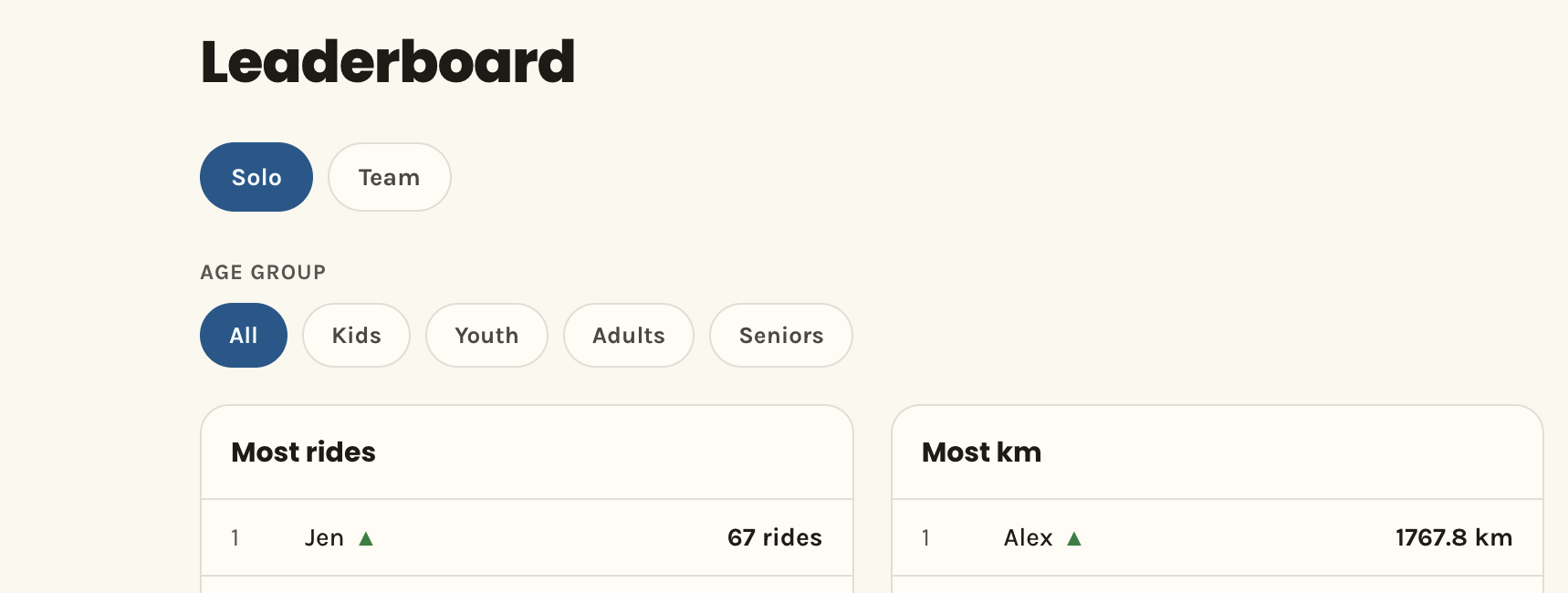
A cycling advocacy organisation I work with wanted a platform to encourage people to cycle more during September. Riders would sign up, join a team or ride solo, and log their rides. The competition was one of the side attractions, with a leaderboard, weekly prizes and a scavenger hunt that sent people to local businesses. It has been a while since I built a public-facing product that people received with this much excitement. That response is the reason I wanted to write this down.## What the platform had to doI started with a short list of requirements. Everything else was optional.1. Riders log their rides through a form. 2. Riders take part in teams. 3. Riders see how they are doing, compared with others or with themselves.## What other people were doingBefore writing code I looked at what already existed. The closest match was [Go By Bike BC](https://gobybikebc.ca/). It had teams, manual ride logging, Strava sync, routes, reports, a community feed and Google sign-in.That confirmed the idea worked, and it gave me a feature list to measure against. The platform had to be for Halifax and not BC, so I got to work.## The stackWe had just about a month to launch, so I needed tools that would help me build quickly. The organisation's server already ran nginx, MySQL and Node, so I wanted something I could host on it. I chose Next.js with Prisma and MySQL. I ran the app under PM2 as a daemon.## One button for sign-up and loginI did not want a difference between signing up and logging in. The site has one "Get started" button. You enter your email, and the site checks whether an account exists. If it does, you go to login. If it doesn't, you go through sign-up.Both paths end with a six-digit code sent by email, so there are no passwords. People forget passwords and then have to reset them, and I wanted entry to be fast. I send the codes through Resend. I left out Google and Apple sign-in. Each OAuth provider is its own set of configuration and compliance work, and I did not have the time.## Logging a rideLogging a ride by hand takes three things, the date, the distance in kilometres and the purpose (commute, recreation, errand or other). That purpose field turned out to matter later, because it let me report that 55% of rides were commutes.Manual entry works, but most people won't keep typing in rides for a month. So the next job was automatic sync from the apps riders already use.## Cycling GuideThe organisation has a strong relationship with Cycling Guide, a cycling app, so connecting it was an easy decision. No integration existed, so I built one.The link works through a webview. The app opens my sign-in page. The rider enters their email and code, and a new rider fills out a short profile. The last screen hands a token back to the app, first through a JavaScript bridge and then, if that fails, through a universal link. I store only a hash of the token, and the app sees the real token once.After that, the app sends one request per finished ride with its own ride ID. If the app retries a request, the site updates the same ride and does not create a second one. A date outside the campaign window gets rejected. Disconnecting happens on my site, which invalidates the token. The app finds out the next time it calls and gets a 401. I wrote a full spec document for the Cycling Guide developers, so they had something to build against.## Strava and the ten-rider limitStrava is the most used cycling app, so it had to be in. I followed their guidelines for OAuth and applied for approval. New developer accounts on Strava can connect only ten riders until they are approved. The approval was supposed to take a week and took longer.The campaign started before it arrived. The ten slots filled, and riders who tried to connect landed on a Strava error page. That was a bad first impression for the people most eager to use the app.I replaced the Connect button with a waitlist. A rider clicked "Notify me" and I saved a timestamp on their account. When Strava approved the app a few days later, I emailed everyone on the list and turned the real button back on.## Ride with GPSRide with GPS got the same treatment. It uses OAuth and sends webhooks, and it excludes indoor and virtual rides, which matches Strava's policy. The first secret I used to check webhook signatures failed against real notifications on launch day, so I switched to the API secret. That was one of several things I could only learn by watching live traffic.## Webhooks, manual sync and the 30-day ruleBoth providers send webhooks. When a rider uploads an activity, Strava posts an event to an endpoint on the site. The handler looks up the integration by athlete ID, fetches the activity from the Strava API and upserts it as a ride. Strava retries on a non-200 response, so the handler returns 200 once the event is well-formed, even if the sync fails. Webhooks can get lost, so I added a manual resync button for riders and a cron route that re-polls stale integrations.OAuth comes with rules, and Strava's rule shaped the data model. When a rider disconnects, I have to delete their synced data within 30 days. Strava also tells me when someone revokes access from their side, so my webhook catches that and schedules the deletion. The rider's rides keep counting until the deadline. If they reconnect first, the deletion is cancelled. Each account can have only one sync source at a time, which stops the same ride from counting twice.## TeamsRiders create teams, share a join code or send invites. While planning this, I expected that some teams would outride others, so a single team leaderboard would have the same winners all month. I gave teams types, such as friend group, cycling club, business, school, health, government, non-profit and family. The leaderboard groups them into organizations, friends and family, and clubs. Each group gets its own corner to compete in.I applied the same idea to riders, with filters for kids, youth, adults and seniors. There are also separate categories, such as total kilometres, number of rides and most consecutive days. A rider who will never win the overall board can still lead a smaller one.## Family teamsI figured parents would add their kids, and some kids don't have phones. A Family team owner can add household members, with only a name and an age group, and log rides for them. Each family member is a real user row with no email and no login. Every total and leaderboard groups by user, so they all worked without changes.## The leaderboard arrowsThe up and down arrows next to each rider were the hardest feature in the build. They show whether your rank moved, and they went through several versions.The first version stored a snapshot. Whenever someone loaded the leaderboard and the last snapshot was more than five minutes old, the site saved every rider's and team's current numbers across seven metrics. To show an arrow, it found the snapshot from about an hour earlier, ranked those old numbers and compared the result with today's ranking. I stored the raw numbers and not the ranks, because rank depends on the filter. A rider's rank among all riders differs from their rank among adults.That table grew fast, because every page load past five minutes added a row for every rider and team on every metric. We reached more than 100,000 records. The arrows were also unreliable. A rider who moved from fifth to third saw an arrow for an hour, and then it disappeared, because "an hour ago" had caught up with the change. I got on a call with my friend Dela to look at it together, and the second version was his idea. It dropped snapshots. The database keeps one row per rider or team per metric, holding the last known rank and the current trend. When a rank changes, I update the row and set the trend. When it doesn't, the trend stays as it was, so an arrow lasts until the next real change. A new rider gets a silent first row with no arrow. It still has a catch. Each filter combination has its own state, and a combination nobody has opened yet starts with no arrows until it has been captured once. The capture also runs inside a page request, so a slow capture slows the page for whoever triggered it. I don't know that I got this right.## The scavenger huntFor the scavenger hunt, I list the participating businesses and generate a QR code for each. A rider scans the code at the location. The phone sends its GPS position, and the site computes the distance to the stop with the haversine formula. If the rider is close enough, the check-in counts. Each stop counts once per rider, and each check-in earned entries in the grand prize draw.## When the database pool filled upA Salesforce workshop I attended a few months earlier had covered database connections, and pooling came up as one of the solutions. That was the first thing I thought of when queries started timing out. I searched Stack Overflow and forums and could not find an answer that matched what I was seeing. Claude Code could not pin down what was happening either.The database pool is capped at five connections, and when it filled up, queries waited 10 seconds and then failed with a pool timeout. It did not recover on its own. My first fix was a watchdog that counted the timeouts. After three within 30 seconds, it exited the process so PM2 would restart it with a fresh pool. That was a bad idea.I changed it to rebuild the pool in place first and exit only if that kept failing. I never found what filled the pool, so the watchdog only limits how long an outage lasts.Riders also reported a timezone bug, which I wrote about in [another post](/posts/i-never-had-to-think-about-timezones).## PrivacyI did not want riders' names showing up in public. The database holds each rider's name and an approval status. For anyone else's view, the leaderboard shows a masked name such as "ey**m", which keeps about a third of the letters at the start and the last letter. A rider always sees their own full name. An admin can approve a name, and approved names show in full. Riders can also opt out of the leaderboard. Their kilometres still count toward their team's total. The ride data holds only distance, date and purpose, and never a route.## The result264 riders logged 3,963 rides across 28 teams. That adds up to 48,641 km, about 1.2 times around the Earth. 349 people made accounts, so about three in four logged at least one ride.55% of the rides were commutes, 33% were recreation and 10% were errands. 82% of rides happened on weekdays, and Tuesday and Wednesday were the busiest. Saturday had fewer rides but the longest, with more total kilometres than Monday, Thursday or Friday. Sept 9 was the busiest day with 216 rides. Sept 12 had the most distance, about 3,300 km, from only 133 rides. Three riders rode every day of the month.The grand prize draw had 3,990 entries from 257 people.Go By Bike Month comes back in June next year, and riders left a lot of feedback. I'm looking forward to building some new ideas that came from watching how people used the site and reading their feedback. The site is at [gobybikehalifax.ca](https://gobybikehalifax.ca).


What Finally Got Me Off WordPress

What Finally Got Me Off WordPress

Every site I built between 2018 and 2025 was on WordPress. I started in 2018 when I founded Jumeni, and back then, next to hand-rolling something in React or Angular, WordPress was just faster. Hundreds of plugins, templates, and site builders already existed for almost anything a client wanted. I built sites for people, launched landing pages for my own ideas, and WordPress was the obvious tool every time.All of it was self-hosted. I'd grab a cheap VPS, install PHP-FPM, Nginx, and MySQL, and stack sites on top of the same box. Writing a custom PHP function to do something a plugin couldn't was never the hard part. The hard part showed up later, in five different shapes, over and over, for seven years.## Malware you can't fully clean by deleting filesI hosted a site for a client who uploaded a nulled WordPress theme. A few days later, the site was redirecting visitors to porn and gambling ads. I cleaned it up. It came back within hours.Whoever cracks a theme to sell or distribute it for free usually plants a backdoor in it first, that's the business model. The backdoor is typically obfuscated PHP, something like `eval(base64_decode(...))`, sometimes a full web shell, and it gives the attacker arbitrary code execution on the server, not just access to that one site. My sites ran under the same Linux user on the same VPS, so the backdoor could write to every file it had permission to touch, including project folders that had nothing to do with WordPress.Deleting the files didn't fix it because the infection wasn't only in the files. Backdoors commonly write into the database too, injecting redirect logic into `wp_options` or creating a hidden admin user in `wp_users`. Clean the files, leave the database alone, and the site rewrites the files right back on its next page load, which is exactly what I watched happen. The actual fix was a full rebuild of every site, a database audit, and isolating each site to its own Linux user so one compromised site couldn't reach the others.After that I put Cloudflare in front of everything and started watching the scan and probe traffic hit my sites. It's constant. WordPress gets targeted at a volume that's hard to appreciate until you're the one watching the logs, which is also why a government website running an outdated WordPress plugin shows up in the news every so often.## Plugins solve one problem and create three moreA plugin is a reasonable way to add a feature until you're running enough of them to notice the resource cost. Finding the right plugin could eat an entire afternoon, and the one that actually did what I needed was usually paywalled behind a premium tier, broken on whatever WordPress version I was running, or close enough that I'd still end up patching it myself. Once installed, every plugin needed updating indefinitely, and updates broke things often enough that I got used to keeping a rollback plan ready before I touched any of them.## Themes outlive the people who built themDesign isn't my strength, I'm a backend person, so I usually bought a theme or built with Elementor rather than design a UI from scratch. Most of the projects I took on weren't worth the time a real UI/UX pass would have cost, and most clients weren't paying for one either.The problem shows up years later. A theme developer stops supporting what you bought and moves on to their next one, and when something breaks on a site that's been running for three years, you're reverse-engineering code nobody maintains anymore. Other times the theme looked great and the code underneath it was trash from day one, you just hadn't hit the part that would show you that yet.## Every page load is a trip to the databaseWordPress renders dynamically by default: every request runs PHP, which queries MySQL for the content, options, menus, and widgets that page needs. There's no static HTML sitting around unless something puts it there. I spent a lot of time on page load optimization, and the honest fix usually wasn't optimization, it was caching, a plugin whose entire job is pretending the page is static so the database doesn't get hit on every visit. The fact that a whole category of plugin exists just to work around this is itself the evidence that the default architecture is the problem.## Moving providers means moving everything by handI switched VPS providers a handful of times, usually chasing cost. Each move meant migrating the database, the configs, the files, and anything else that made the site work. Migration plugins exist, but the ones that actually work well enough to trust aren't free, and I wasn't paying for a tool to do something I could technically do myself. So I did it by hand, every time, for every site. Nobody made me do this. I still hated it, because WordPress has enough moving pieces that nothing about the process ever got easier the second or third time.## Finding AstroI saw a post about Astro on X and had never heard of it before. Most of what I'd built was content: no interactive backend, no reason to run PHP-FPM or any server process at all. I already write Markdown constantly like any other developer, and Astro's whole model is content as files, no database required for a site that's fundamentally content.Astro still supports interactive pieces when something actually needs them, through what it calls islands: you can drop in a React, Vue, Svelte, or Alpine component next to plain static markup, and only that one component ships JavaScript to the browser and hydrates. Most of the page stays static by default.The part that mattered most practically: free hosting. I could decommission a VPS entirely and host on Cloudflare Pages at no cost. Every problem on my list up to that point, malware surface, plugin sprawl, theme rot, database-per-request latency, migration pain, came from running a dynamic, database-backed, plugin-dependent system myself. Astro sidesteps the category by not being that kind of system in the first place. Node modules replace plugins, and I'd take that trade every time.## Why AI tipped it the rest of the wayAI-assisted coding is the biggest reason I actually moved, more than any of the above. Tools like Claude Code work on files and git history: they read code, edit it, and show you a diff. WordPress content and Elementor's page-builder output live in the database as serialized state, not files. Elementor does have its own history feature for its page builder, and I never fully understood how it worked or trusted it enough to rely on it. Astro's content is markdown files and components sitting in a repository I already know how to version with git.Changing something on WordPress, swapping a slider, adjusting a layout, used to take real mental effort to locate and change safely. On Astro, when I actually want AI's help with a change, it fits into the same git workflow I already use for everything else, instead of being its own separate, fragile process.## A few sites inThe first thing I migrated was [jumeni.com](https://jumeni.com), the startup I had back in Ghana. I did the whole migration in one Saturday afternoon. The site went from a couple of seconds to load to instant, and it stops being something that can go down just because I'm making a change on a server, because there's no server running it anymore.The second was [jabbco.ca](https://jabbco.ca/), a property site I offered to build for my landlord specifically to test where Astro's limits are for something that needs a bit of backend. That's its own story for another time.This site, [eyramm.com](https://eyramm.com), runs on Astro too. If you're reading this, you're already looking at the result.A few months after I started using it, Cloudflare acquired The Astro Technology Company outright and committed to keeping it open source, with Astro's own team saying it'll stay "the best way for developers to build content-driven websites, whether they host on Cloudflare or elsewhere." Not every framework survives long enough to get acquired instead of abandoned, and I was already bullish on Cloudflare as a product I use constantly. That's one more reason to trust the bet I'd already made.

Running Two Instances Means Every 'Once' Becomes 'Twice'

Running Two Instances Means Every 'Once' Becomes 'Twice'

I maintain a Laravel app that used to run everything, nginx, PHP-FPM, the queue workers, the scheduler, in a single container on DigitalOcean's App Platform. After running for a while, that container would quietly stop processing new jobs while the process itself kept running. Chasing that turned into most of a year, and along the way it turned out to be at least three different problems wearing the same symptom.## First guess: something in PHP-FPM is leakingThe first theory was that long-lived worker processes were accumulating state they shouldn't, so we recycled them: kill a PHP-FPM worker after 200 requests, kill idle workers outright so they'd stop holding database connections open. That helped, somewhat.It also introduced a new failure that hadn't existed before: a worker due for recycling doesn't know or care whether it's in the middle of a long job when its number comes up. Short jobs never noticed. A job that ran long enough to still be going when its worker hit the recycle threshold got cut off mid-execution, sometimes with no error at all, just a job that silently never finished.We swapped one problem for another: now individual long jobs sometimes just vanished mid-run instead. We increased how long supervisor waits before force-killing a process, more than once, to give long jobs time to finish before a recycle or a deploy cut them off.## A detour that went nowhereAround the same period we tried more PHP-FPM pool tuning, more worker processes, fewer child processes per worker, and separately tried running the PHP-FPM master under a different user. That last one got reverted almost immediately. Some of what we tried here led nowhere, and was still worth ruling out.## First attempt at isolating the workerLater on, we gave the queue workers and the scheduler their own container, separate from the API, so a slow worker restart couldn't affect anything serving requests. We reverted it not long after. The scheduler had been running through the OS's own cron, firing `artisan schedule:run` every minute in that separate container, and something about that setup wasn't holding up, so we merged everything back into one container and switched the scheduler from cron to Laravel's own long-running `schedule:work` loop instead. First split, undone.## The bug that had nothing to do with any of thisDeep into the staleness hunt, while doing another pass on worker reliability, we found this sitting in the queue config, untouched since before any of the above started:```php // before 'retry_after' => 90,// after 'retry_after' => 900, ```The workers ran with `--timeout=300`, five minutes before Laravel itself would kill a job. `retry_after` is a different number: how long the queue driver waits before deciding a job must have died and releasing it back onto the queue for someone else to pick up. It was set to 90 seconds. Any job that legitimately ran past a minute and a half, still well inside its real five-minute budget, looked abandoned, got requeued, and got picked up by another worker while the first one was still quietly finishing it. Two workers, same job, same data, at the same time.## Splitting the container again, properly this timeAround the same point, we split the worker and the API into their own containers again, this time for good: an API-only config, and a worker config running three worker processes side by side plus one dedicated scheduler process. Three worker processes sharing a queue is fine, Laravel reserves a job atomically, so two of them can never grab the same row. The scheduler doesn't get that guarantee, and the split made it possible for the worker config to run as more than one instance with nothing stopping it.## The duplicate that followedLater, a weekly reminder job started sending the same reminder twice. The worker container had ended up running as more than one instance, and two copies of `schedule:work`, one per instance, don't know about each other. The fix was:```php $schedule->job(new ReminderJob) ->weekly() ->onOneServer() ->withoutOverlapping(); ````onOneServer()` is a lock in whatever cache the containers already share, so only one instance actually runs the job even though every instance still evaluates the schedule. It held.## The instance nobody was countingJobs weren't just running twice around this time, some ran three or four times, and the logs made it look like one instance misbehaving, because a staging environment had been set up with the same environment variables as production, including the live credentials, and pointed at the same log channel. What gave it away was the instance ID on each log line: two different IDs kept showing up where I expected one, pointing at a second instance with a real copy of the customer database and a real way to reach it.That second instance stacked on top of production's own problem: the same worker container running as more than one instance that caused the reminder job to duplicate was still happening, just not yet caught with a lock everywhere it needed one. Production duplicating a job on its own, plus an uncounted second instance running that same job against the same real data, is how something ends up happening four times instead of two.If there's a single lesson across all of this, it's to architect the deployment before you build it, decide up front how many instances of each process can run and what's shared between environments that shouldn't be. But where do you actually draw the line between architecting ahead and just fixing things as they come up, so you learn from them?

My Take on Spider-Man: Brand New Day

My Take on Spider-Man: Brand New Day

I left the theater impressed by the visuals and cinematography. The movie took me through the full range of emotions: happiness, sadness, tears, and frustration. And yet, I left feeling kind of empty. Despite everything it did right, I wasn't blown away.## What I lovedPunisher can do no wrong in my eyes. I went into this movie worried they would soften his character, the way so many male characters seem to get these days. Thankfully, he's still the same hardcore guy, carrying all his trauma and remaining firmly in anti-hero territory. He's not just a hero with a Punisher skull slapped on his chest for branding.The visuals were incredible. The first-person shots from inside Spider-Man's suit, the attention to detail, and the seamless transitions between CGI and practical effects all looked fantastic.The performances were excellent across the board. Jean's actress was especially impressive whenever she switched between possessing different people. Those scenes were a real highlight. Metzger was great, too. The entire cast delivered.I also liked the decision to have MJ genuinely forget Peter. When she tells him outright that she doesn't love him because she doesn't know him, it makes the consequences of his choice to erase himself from her memory feel real. They don't just fall back into each other's arms because of feelings left over from their past. Peter has to live with what he gave up.The runtime didn't feel padded, either. The movie took its time explaining things without making the experience feel unnecessarily long. I definitely felt like I got my money's worth.## What didn't work for meThe biggest issue for me was Jean Grey's character development. The movie gives us some of her backstory: she's searching for her sister, Sara, who was taken by the Department of Damage Control for experiments. Metzger, the head of DODC, lies to both Jean and Spider-Man about what happened to Sara.That's all interesting, but I wanted more time to get to know Jean before things escalated. I'm used to older Marvel movies taking their time developing their villains, and this one felt rushed. Jean goes from being a scared kid with powers to putting all of New York under a telepathic hex in what feels like a very short time.Compare that to Wanda. We'd already spent several movies getting to know her before *WandaVision*, so when she puts an entire town under a hex, we understand how she got there. We've seen her power, her grief, and her struggles build over time. With Jean, that escalation happens so quickly that it doesn't have the same impact.I'm also getting tired of the whole "talk the villain down" ending. After all the fighting, it comes down to a heartfelt speech, a hug, or some kind of mental intervention that calms the villain down instead of delivering a more satisfying resolution. It works here, but I've seen this same formula too many times. *Thunderbolts* did it, too. Why spend the entire movie building toward a final confrontation if everything gets resolved by talking at the last second?And then there's the post-credits scene, which honestly lost me. Ned's tracker pulls back from our Earth, passes the Moon, and picks up a Spider-Man signal somewhere else, possibly in another universe.But how does that work? Does every universe have its own Spider-Man tracker? Whose tracker is Ned even using? Is it somehow tracking our Peter across universes, or is it picking up a completely different Spider-Man in another universe?The scene doesn't explain any of this. I get that post-credits scenes are meant to set up future stories, but a tease should still make some kind of sense on its own. Here, it just left me confused.

Migrating a Live MySQL Database Without Downtime

Migrating a Live MySQL Database Without Downtime

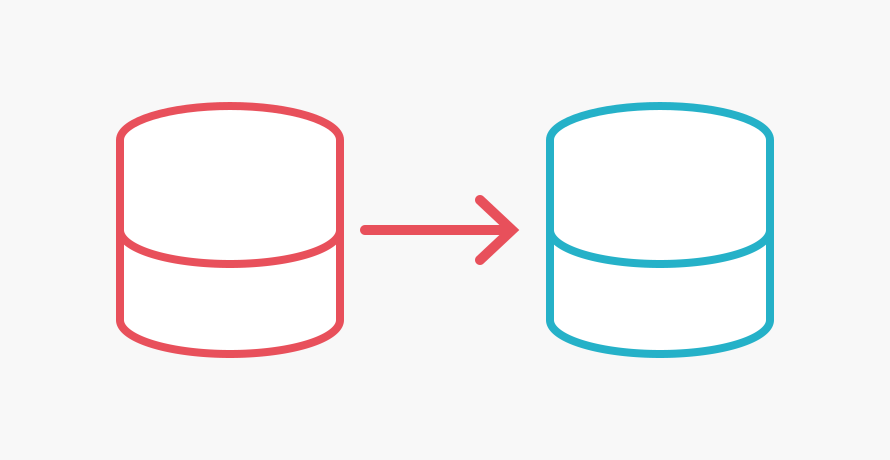
I move projects between hosting providers more often than most people, so this comes up a lot. The scenario: MySQL on a VPS, real traffic on it, moving to a different provider, sometimes managed, sometimes just another VPS. I want the switch to take seconds, not a maintenance window.The simplest way to do this is to just stop the app, dump the database, restore it, and start the app back up:```bash # on the app server: stop whatever writes to the database sudo systemctl stop your-app# on the old database: dump everything mysqldump --single-transaction --routines --triggers -u root -p your_database > dump.sql# copy it over, then restore on the new database mysql -h new-database-host -u admin -p your_database to any port 3306 ```That's the OS-level rule. On top of it, also open the same port at the platform level:- **AWS EC2:** an inbound rule for port 3306 on the instance's Security Group. - **Azure VM:** an inbound rule on the VM's Network Security Group (NSG). - **Source is a managed database** (RDS, Azure Database for MySQL): just add the new database's IP to that resource's own "allowed IP ranges" setting.Scope it tightly, ideally to just the new database's IP, and close it again once the migration is done.## 4. Seed the new database with a consistent snapshotReplication only streams changes going forward, so the new database needs a starting point first. With GTID mode on, `mysqldump` can capture that starting position automatically:```bash mysqldump --single-transaction --set-gtid-purged=ON -u root -p your_database > seed.sql ````--single-transaction` takes a consistent snapshot without locking the tables. `--set-gtid-purged=ON` embeds the exact GTID position the snapshot was taken at, right into the dump file. Restore it on the new instance:```bash mysql -h new-database-host -u admin -p your_database

CORS Errors Are the Browser Doing Its Job

CORS Errors Are the Browser Doing Its Job

I dread CORS in every new project I start. Everything works fine in my local environment, and the moment I hit production, the frontend refuses to talk to the API. I spend hours on Stack Overflow, and more recently Claude and Gemini, trying different fixes until one of them finally works. I've never actually sat down and understood how CORS works, I've just pattern-matched my way through it project after project. So here's me trying to actually explain it, instead of just making the error go away again.## Why it only shows up in productionThe reason it never happens locally is usually an accident of setup, not anything you did right. Locally, your frontend and backend are often on the same origin already, both on `localhost`, sometimes literally the same port through a dev server proxy. Same origin means the browser has nothing to check, so CORS never even engages. Your local setup didn't get CORS right, CORS just never had a reason to show up.Push to production and that usually changes. Your frontend is on one domain, your API's on another, or a different subdomain, or a different port, any of which counts as a different origin to the browser, and now it actually has to decide whether the frontend is allowed to read what the API sends back. Production is just the first time your setup actually forces that decision to happen.## What CORS is actually decidingCORS, Cross-Origin Resource Sharing, is a browser-enforced rule that controls which websites are allowed to *read the response* your backend sends back. Your API still runs the request either way, the database still gets hit, the logic still executes. The browser is the thing deciding, after the fact, whether the page that asked is actually allowed to see what came back. By default: no, unless you explicitly say otherwise. That's the distinction I kept missing every time I hit this error: the request succeeds, and the browser is the one deciding afterward whether to hand the response over to whoever asked.## The shortcut that breaks the ruleThe failure looks the same almost everywhere it happens, and it's the fix I always found first. A frontend hits a CORS error in the console, the backend logs `origin not allowed`, and instead of adding that one origin to a list, it's much faster to reach for the setting that makes every version of the error disappear at once:``` Access-Control-Allow-Origin: * Access-Control-Allow-Credentials: true ```Or worse, and this one took me longer to recognize as the same mistake, the backend just reflects back whatever `Origin` header the request sent, and calls it allowed:```js // This "fixes" every CORS error you'll ever see. That's the problem. res.setHeader("Access-Control-Allow-Origin", req.headers.origin); res.setHeader("Access-Control-Allow-Credentials", "true"); ```That second one reads like it's doing something more careful than a bare wildcard, since it's echoing a real value instead of `*`. It isn't. It says yes to literally every origin that ever asks, one at a time, which from a security standpoint is the same wildcard wearing a disguise.## What that actually opens upA user is logged into your app, `bank.com`, and has a valid session cookie sitting in their browser. They then visit an unrelated page, `evil.com`, that has nothing to do with you, maybe a link in an email, maybe an ad. That page makes a request to `bank.com`'s API from JavaScript running in the visitor's browser.The browser does something it always does, regardless of which site is asking: it attaches the user's session cookie for `bank.com` to that request automatically, because as far as the browser's concerned, the request is going to `bank.com`, cookies for `bank.com` belong on it. Your backend sees a logged-in session and does what it always does, it responds with real data.The only thing standing between `evil.com` and that response is whether the browser lets the page on `evil.com` actually *read* it. If your CORS config reflects any origin and allows credentials, the answer is yes. No password needed, no SQL injection, no exploit beyond visiting a page. Profile data, contact lists, transaction history, private messages, whatever the endpoint returns to a logged-in user, an attacker's page can read it, silently, off a session cookie that was never theirs.## Why the shortcut is so temptingNobody sets this up on purpose. You spend hours developing and just want the quickest way to get your app into production. Reaching for the setting that makes the CORS error disappear feels like clearing the last obstacle in your way. What actually gets cleared out of the way is the one check that was doing its job, and the setting that makes it stop complaining hands that check over to whoever asks next.## What actually fixes itHere's what I wish had been the first search result instead of the tenth workaround:1. **Never combine a wildcard with credentials.** `Access-Control-Allow-Origin: *` plus `Access-Control-Allow-Credentials: true` is a combination browsers themselves are supposed to reject, but reflecting the origin dynamically gets you the same result while looking like it passed a check. If cookies or credentials are involved anywhere, a wildcard is not an option. 2. **Use a real allow-list.** Keep the actual set of origins your frontend runs on in config, pulled from an env var, not hardcoded and not a wildcard: ``` ALLOWED_ORIGINS=https://app.example.com,https://admin.example.com ``` Check the incoming `Origin` header against that list on every request, and only echo it back on a match. Adding a new environment means adding a domain to one env var, not touching code. 3. **Never reflect the origin unconditionally.** Reflecting whatever `Origin` header shows up is not the same as validating it. If the value isn't in your allow-list, don't echo it, and don't set the header at all. 4. **Only allow credentials where it's actually needed.** If your frontend authenticates with a cookie instead of a bearer token, both sides have to opt in explicitly: the frontend sets something like `withCredentials: true` on its requests, and the backend has to separately mark that specific origin as trusted to receive the cookie, not just allowed to make requests. Those are two different permissions, and it's easy to grant the second without meaning to. 5. **Handle preflight requests properly.** Browsers send an `OPTIONS` request first for anything beyond a simple GET, checking whether the real request would be allowed. Respond to it correctly instead of disabling it or auto-approving everything to make it stop complaining.

Understanding CSRF

Understanding CSRF

Cross-Site Request Forgery (CSRF), sometimes called the one-click hijack, doesn't announce itself the way CORS does. While you're building or testing a feature, nothing looks broken, because the request actually succeeds. That's what makes it easy to never think about: a vulnerable endpoint looks identical to a normal one, right up until someone else is the one sending the request.## Why it's invisible in normal useMost attacks, phishing, social engineering, credential stuffing, need the victim to slip up somehow. CSRF doesn't need any of that. The user doesn't do anything unusual, and in the worst cases doesn't do anything at all. Their browser does exactly what it always does, and that is the entire attack.## Why the browser cooperatesThe mechanic behind it is one line: browsers attach a site's cookies to any request going to that site, regardless of which page triggered the request. If you're logged into `bank.com`, your browser holds a session cookie for `bank.com`. It doesn't matter whether the request came from a link you clicked on `bank.com` itself or a form auto-submitting from `evil.com` in another tab, the cookie goes along either way, because the browser only looks at where the request is going. The origin of the request and the origin of the page that triggered it are two different things, and the cookie only cares about the first one.So the attack looks like this: you're logged into `bank.com`. You visit `evil.com`, which has a hidden form wired to submit to `bank.com/change-email` the moment the page loads. Your browser attaches your `bank.com` session cookie. The backend runs its usual checks: is the user logged in, is the session cookie valid, is the request formatted correctly. All of it comes back clean, because none of those checks depends on which page actually sent the request, and it processes the change. No password required, no access to your session token, nothing beyond you loading a page.## What actually fixes it1. Add a CSRF token to every sensitive `POST`, `PUT`, or `DELETE`. The backend generates a random token, embeds it in the form (frameworks like Laravel or Rails do this by default), and rejects the request if the token doesn't match. A page on another domain has no way to read your token to include it, since reading it would require the same cross-origin access CORS already blocks. For a stateless API with no server-side session, the same idea works as a double-submit cookie: the token sits in a cookie and has to come back matching in a request header, so a cross-site request carries the cookie automatically but still can't forge the header. 2. Set session cookies to `SameSite=Strict`, which stops the browser from sending them on requests that originate from another site at all. `SameSite=Lax` is the more common default and still blocks the dangerous cases, while allowing normal cross-site navigation like following a link. 3. GET requests should never modify data, use POST or better for anything that changes state. A GET-triggered mutation can be fired from something as simple as an `` tag, no JavaScript, no form, nothing that looks like an attack at all. 4. Changing an email, password, or payment method should require the current password or a 2FA code again, even mid-session. That turns a forged request into one that fails at the one check it can't forge its way past. 5. Accept only `application/json` on API endpoints and reject form-encoded submissions. That closes off the classic CSRF payload shape, a plain HTML `` submitting to your endpoint. 6. Check the `Origin` or `Referer` header against your own domain on sensitive requests. Some proxies strip these headers, so it's not reliable enough to stand alone, but it's a cheap second check worth having alongside a token, not instead of one.None of that requires the user to be careless. Every check the backend runs comes back clean, right up until the one nobody added: confirming the request actually came from your own frontend.

Two Ways to Get Secrets Into a Container

Two Ways to Get Secrets Into a Container

Every containerized app needs real credentials at some point: database passwords, API keys, tokens for whatever third-party service you're calling. The question is never whether your app needs them. It's when and how it gets them, and that turns out to have two genuinely different answers, not one obviously correct one.## The problemA Docker image is meant to be portable. You build it once and the same image can run locally, in staging, in production. That only works if the image itself doesn't know anything environment-specific, including credentials. So secrets can't be baked in at build time. They have to arrive some other way, after the container starts, in whatever environment it's actually running in.There are two main shapes that answer can take.## Option one: fetch everything once, at startupOne approach is to store a single secret per environment: a JSON blob containing every credential the app needs, as key-value pairs. Basically the same shape as a `.env` file. When the container starts, an entrypoint script fetches that blob with one API call and exports every key inside it as a real environment variable, before the app itself even launches. From then on, the app just reads config the normal way, `getenv('TWILIO_SECRET')` or whatever your framework calls it. It has no idea any of this happened.This is easy to reason about and easy to build. One API call at boot, one place to look when you need to add a new variable, and local development ends up looking almost identical to production, since both are just "environment variables" from the app's point of view.But it comes with real costs:- You fetch the whole blob even if the app only needs three of the twenty keys in it. - Access control and rotation happen at the secret level, not the key level: anything that can read the secret gets every key in it, and most rotation tooling expects one secret per credential, not twenty bundled together. - Once the container starts, the actual values sit in the process environment for the container's whole life. Anything that can read that process's environment can read every secret, and it's easy to accidentally leak one into a log line or an error trace if you're not careful about what you print.## Option two: fetch on demand, per keyThe alternative is to not resolve secrets at startup at all. Instead of an environment variable holding the actual value, it holds a reference: a secret name, an ARN, a path. Something like `TWILIO_SECRET_REF=projects/x/secrets/twilio-token` instead of `TWILIO_SECRET=the-actual-token`. The real value only gets fetched at the moment something actually needs it, either because the app calls the secrets API directly, or because the platform resolves it on the way in.Some platforms support this natively. AWS ECS and Fargate, for example, let you point a container's `secrets` field at entries in Secrets Manager or Parameter Store directly, and the platform injects the resolved value at launch without the app ever calling an API itself. Other setups use a sidecar, something like a Vault Agent running alongside the app, whose whole job is fetching and refreshing secrets and handing them to the main process.This buys real things: each secret can be rotated and audited on its own instead of as part of one big blob, access can be scoped per secret instead of per environment, and depending on the implementation, the actual value might never sit in a plain environment variable at all.It also costs something: the app or platform now has a runtime dependency on the secrets API being reachable, not just at boot but potentially every time a value is needed. One more thing that can fail, one more thing to reason about when something breaks.## What's actually being traded offStrip away the mechanics and it's the same tradeoff that shows up everywhere in infrastructure: precision versus complexity. Bulk-fetch-at-startup is simple enough for a small team to understand in one sitting, and it's the one I reach for most on personal projects. Per-key resolution is more precise and more auditable, at the cost of being one more moving part that can fail.Neither is correct in the abstract. What matters is what's actually true about your team, your scale, and what you're accountable for, not which pattern is theoretically better.

I Never Had to Think About Timezones. Then I Did.

I Never Had to Think About Timezones. Then I Did.

Ghana sits on GMT+0. No daylight saving, no offset, nothing. For most of my life, "the time" and "the time in Greenwich" were the same number. I never had a reason to think about timezones, because I had never once been in a situation where they mattered.That turned into a blind spot I didn't know I had until dates started landing on the wrong day while I was building [Go By Bike Halifax](https://gobybikehalifax.ca/). Someone would log something in the evening and it would save under tomorrow's date instead of today's. Not always, only in a narrow window late in the day. It took me a minute to see the shape of it, and honestly, a part of me felt a little silly once I did.Here's what was actually happening. Most servers, no matter where they physically sit, run their internal clock in UTC. That's true whether the datacenter is in Virginia, Frankfurt, or Halifax. So "the server is in Canada" tells you nothing about what timezone the server's code thinks it's operating in, those are two completely unrelated facts. If your code asks the system for "today's date" without explicitly saying which timezone you mean, you get UTC's today, not the user's today. And Halifax is three hours behind UTC. So for the last three hours of every Halifax day, UTC has already rolled into tomorrow while it's still today for everyone actually using the app. Anything logged in that window gets silently mis-dated.The reason this was invisible to me for so long isn't that I was careless. It's that growing up at GMT+0 never gave me a reason to notice it. If your local time and UTC are always the same number, code that quietly assumes "local time equals UTC" is never wrong. It's not a bug you can trip over by accident when you live at GMT+0, because your own lived experience of time never contradicts it. The bug was always there, waiting for someone whose day doesn't line up with Greenwich's.Once I actually looked, the bug wasn't in one place. It was everywhere something touched a date: the code that saved a new entry, the code that displayed it back, a date picker that wouldn't let you select today after a certain hour, a stats calculation that was quietly three hours off. Each one was a separate place someone had to independently notice that the server's idea of "now" and the user's idea of "now" were not the same thing.The fix, in every case, was the same principle: never trust the ambient system clock's notion of "today." Explicitly anchor every date operation to the timezone that actually matters, the one the humans using the app are standing in, not the one the machine running the code happens to default to. It sounds obvious written down. It clearly wasn't obvious to me, until I was the one debugging it.In practice, that means never doing this:```js // Wrong: "today" according to whatever timezone the server happens to be in const today = new Date().toISOString().slice(0, 10);// Also wrong: same mistake, different method const label = someDate.toLocaleDateString(); ```And always naming the timezone explicitly instead of letting it default silently:```js // Right: pick the timezone that actually matters, every time function localDateString(date, timeZone) { return new Intl.DateTimeFormat("en-CA", { timeZone }).format(date); }const today = localDateString(new Date(), "America/Halifax"); ````Intl.DateTimeFormat` is built into JavaScript, handles daylight saving automatically, and takes any IANA timezone name, `America/Halifax`, `Africa/Accra`, whatever's actually relevant to your users. The moment a date touches your code, it should pass through something like this, never the bare system default.One thing worth being precise about: hardcoding `"America/Halifax"` was correct here specifically because Go By Bike Halifax is a single regional campaign, everyone's "today" is Halifax's today, no matter where someone happens to be logging in from. That's not the general answer for every app. If your users are actually spread across timezones and each of them cares about their own local day, a single hardcoded string is the same mistake in a different shape. What you need there is the timezone detected per user, usually via `Intl.DateTimeFormat().resolvedOptions().timeZone` on the client, stored against their account, and passed in instead of a constant. Same mechanism, the value just has to come from the user, not from you.There's a third option too: let the server send the raw UTC instant and let the client format it, using whatever timezone the viewer's own device is already set to. No detecting or storing anyone's timezone at all. It works well when a date is really a preference of whoever's looking, something like "posted 3 hours ago," where you want it to match the viewer's own clock. It works less well when the date is a fact about the subject itself, anchored to a place, since then it shouldn't change depending on who's looking or where they happen to be. Which of the three approaches is right comes down to that one question: is this date a fact about the thing it describes, or a preference of whoever's reading it.I don't think this makes me careless so much as it makes me someone who'd simply never been handed a reason to know. But I'd rather know it now than keep being surprised by it later, one silently mis-dated evening at a time.